

The 5 AI Engineering Problems That Break Most Production Agents
Everyone is building AI agents right now.
A model, a system prompt, a couple of tools, maybe a vector database—and suddenly you have something that looks impressive in a demo.
But production is where the real problems begin.
Your agent gives the wrong answer because it missed an important document. Costs spike because every request sends the entire chat history. A prompt update fixes one use case and silently breaks three others. Or worse, the agent gets permission to perform an action it should never have been able to perform.
The hard part of AI engineering is not calling an LLM.
It is designing the system around it.
In this post, I’ll break down five problems every production AI application eventually faces:
- Context
- Cost and latency
- Evals
- Guardrails
- Tool access and agent permissions
Let’s start with the one that affects almost everything else.
1. Context: The Model Can Only Work With What It Sees
An LLM is not magical memory.
It only knows its training data, the system prompt, the current user message, conversation history, retrieved documents, and tool responses.
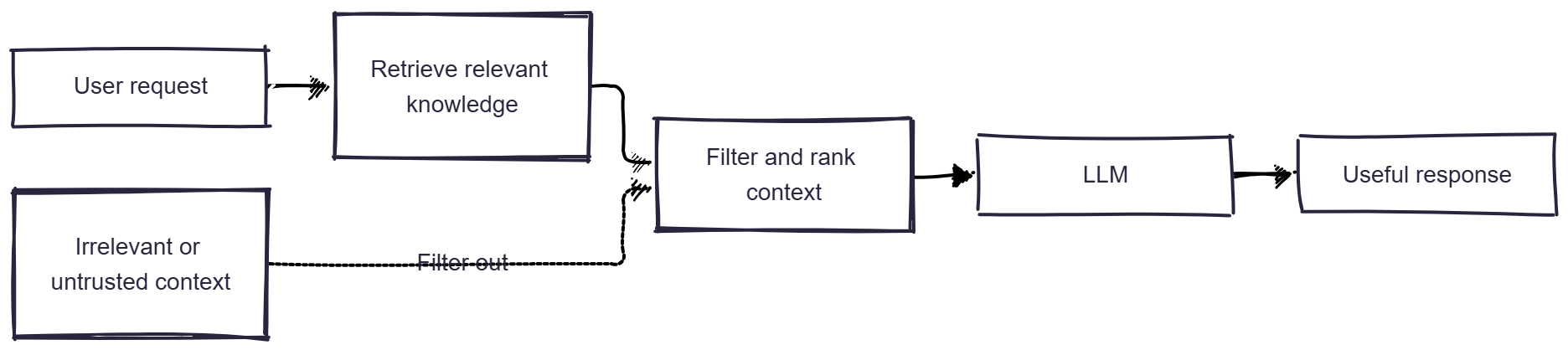
If important information is missing, the model guesses. If you send too much irrelevant information, the model gets distracted, slower, and more expensive.
This is why most RAG and agent problems are actually context problems.
Imagine a support agent answering this question:
“Can I cancel my annual plan and get a refund?”
It does not need your entire company knowledge base. It needs the user’s plan details, the cancellation policy, the refund policy, and perhaps previous support history.
Sending 200 unrelated documents into the prompt does not make the agent smarter. It makes its job harder.
How to solve it
- Retrieve only the most relevant documents.
- Use metadata filters before vector search where possible.
- Summarize long conversation history.
- Keep system instructions stable and clear.
- Validate anything stored as long-term memory.
- Do not blindly inject every tool response into the next prompt.
Context is not just data. Context is the model’s working environment.
If that environment is noisy, stale, or untrusted, the output will be too.
Further reading: Anthropic Engineering
2. Cost and Latency: Cheap Per Request Can Become Expensive Very Fast
The first LLM API call usually looks cheap.
Then production happens.
Now you have long system prompts, conversation history, RAG documents, retries, multiple model calls, tool calls, agent loops, and thousands of users.
Your “cheap” AI feature becomes one of the most expensive parts of the product.

The mistake is optimizing only for model quality.
The real metric should be:
What does one successful user outcome cost?
For a support agent, that might mean the user gets the right answer without needing human support. For a coding agent, it might mean the agent creates a correct pull request without unnecessary tool calls.
How to solve it
- Use small models for classification, extraction, routing, and simple formatting.
- Reserve stronger models for reasoning-heavy tasks.
- Cache repeated system prompts and common context.
- Set a maximum token budget per run.
- Set a maximum number of tool calls.
- Track latency alongside cost.
If an agent searches five times before answering a simple question, the problem may not be the model. It may be your retrieval strategy or tool descriptions.
Further reading: Context caching — Google AI
3. Evals: “Looks Good to Me” Is Not a Measurement Strategy
This is where many AI projects fail.
A developer changes the prompt, tests three examples, gets good results, and ships it.
Then a real user asks something slightly different and the agent fails.
A prompt change can improve one task and make another one worse. A model upgrade can produce better writing but worse tool selection. Without evals, you find regressions in production.

How to solve it
Start small. You do not need a huge benchmark on day one.
Build a dataset of 20–50 real tasks your users actually ask. For each example, define what success means:
- Was the answer correct?
- Did the agent use the right tool?
- Did it avoid making things up?
- Did it follow the expected format?
- Did it avoid unsafe actions?
- How many tokens and tool calls did it use?
For agents, do not evaluate only the final answer. Evaluate the full trace.
Every production failure should become a future eval case.
That one habit makes your AI system better over time.
Further reading: Demystifying evals for AI agents — Anthropic
4. Guardrails: Prompts Are Not Security Boundaries
A system prompt can say:
Never reveal sensitive data.
That does not mean the model will always behave perfectly.
Users can try jailbreaks. Retrieved documents can contain hidden instructions. Tool outputs can contain malicious content. A model can accidentally return private information or invalid JSON.
This is where guardrails matter.

Guardrails are the checks around the model. They are not one feature. They are multiple layers.
How to solve it
- Validate user input before sending it to the model.
- Redact personally identifiable information when needed.
- Require structured outputs for actions and workflows.
- Validate JSON before using it.
- Validate tool arguments before executing them.
- Scan outputs before returning them to users.
- Block or escalate suspicious requests.
A system prompt is guidance. It is not a security boundary.
Further reading: Safety in building agents — OpenAI
5. Tool Access: The Most Important Problem as Agents Become More Powerful
A chatbot giving a wrong answer is annoying.
An agent deleting a production record, sending an email, changing a subscription, or accessing sensitive customer data is a real incident.
This is why tool access is not just an implementation detail. It is a security decision.

The question is not:
“Can the agent use this tool?”
The better question is:
“What is the worst possible outcome if this tool is used incorrectly?”
How to solve it
Use least privilege.
- Give agents only the access they need.
- Separate read actions from write actions.
- Use short-lived credentials.
- Scope each tool tightly.
- Require approval for destructive, financial, or externally visible actions.
- Log every tool call.
- Make it easy to revoke access.
Instead of giving an agent unrestricted database access, expose narrow tools such as getCustomerById(customerId), getInvoicesForCustomer(customerId), and createDraftRefund(customerId, amount).
Notice the word draft.
The agent can prepare a refund, but a human approves the final action. That design is much safer than exposing unrestricted SQL.
Further reading: NIST: key mitigations for agentic AI
Final Thoughts
The hardest part of AI engineering is not prompt writing.
It is building the system around the model.
A production-ready AI application needs:
- the right context,
- controlled costs,
- reliable evals,
- layered guardrails,
- and safe access to tools.
The teams that solve these problems will build AI products that users trust.
The teams that ignore them will build impressive demos that fail the moment real users arrive.
If you are building an AI agent today, start with one question:
What can this agent see, what can it do, and how will I know when it gets either one wrong?
That is where real AI engineering begins. 🚀
About the author
- Backend engineer building ShiftMailer, an AI-powered email tool. Sharing lessons from shipping AI agents and scalable systems. Follow for real-world AI, product, and engineering insights—no fluff.
Comments
Join the discussionNo comments yet. Be the first to comment.


